

Staying up to date on the latest SEC Filings is no easy task. In 2024, SEC EDGAR uploaded over 17,000 10-Q filings alone. Even with the SEC EDGAR search tool, that is a lot to parse through. Luckily, you don’t have to. Our SEC EDGAR API will do the searching for you. Whether you’re an investor, fintech developer, financial analyst, or researcher, SEC Filings has you covered.
Table of Contents
- What Is Our SEC EDGAR API?
- Key Features
- Who Is Our SEC EDGAR API For?
- Our API Services
- See Our Query API in Action
- Example: Searching For 10-Q Filings
- Example: Technology Sector 8-Ks Mentioning “bankruptcy”
- Getting Started
What Is Our SEC EDGAR API?
Our variety of APIs are fast, reliable, and user-friendly. With our SEC EDGAR API, you can search, stream, parse, convert, and download any publicly available SEC filing. There is no need to waste hours manually downloading filings or navigating clunky databases when the information you need is just a query away.
Key Features
- Real-Time Filing Access: Our APIs access all new SEC Filings in less than 200 milliseconds on average.
- Free API Key: Our free Data and API Services plan includes 125 API calls, so you can try it before you buy it.
- Comprehensive Filing Coverage: Our database hosts over 18 million filings dating back to 1993.
- Extensive support: We support over 150 filing types. From 8-K filings to Annual Reports, SEC Filings has it all.
- User-Friendly Interface: Our Sandbox is just a click away. If you get stuck, our extensive documentation will help you get back on track.
Who Is Our SEC EDGAR API For?
Our SEC EDGAR API is for anyone who needs fast and reliable access to the latest filings. Our scalable products can adapt to fit your needs, whether you’re a lone investor or a startup CEO. However, our API is ideal for the following:
Investors
Use our API data to stay ahead of the market. Track market-moving events like insider trades or bankruptcies so you can make informed investments.
Analysts
Spend more time analyzing your data and less dredging it up. Our APIs update in real time, so you can stay informed down to the millisecond.
Academic and Economic Researchers
Seamlessly access financial data dating back to 1993. Watch historical market shifts and discover modern trends on the same platform.
Compliance and Legal Teams
Use our APIs as your legal research assistant. Monitor corporate disclosures and regulatory risks, or keep an eye on major material events.
Startups
Empower your business and your users at the same time with the latest financial data. Add our SEC EDGAR API to your toolkit to catch industry trends early and run informed risk assessments.
Financial News Outlets
Be the first on the scene with real-time access to SEC disclosures. Keep your audience up to date with millions of SEC filings at your fingertips.
Our API Services
Query API
Search your way with over 20 search parameters, including filer ticker symbols, CIKs, date ranges, and more. Our Query API delivers the filings you need in JSON format so you don’t have to wrestle with hard-to-parse files.
Section 16 Insiders API
Keeping track of Insider transactions has never been easier. Get instant access to an insider transaction database with our Section 16 Insiders API. Track details like transaction types (buy or sell), transaction dates, the number of shares traded, the insider’s identity, and the transaction price.
Form D API
Get the latest security offering information with our Form D API. Our Form D API scans the EDGAR database for you and converts the XML data into a searchable JSON format. You won’t have to struggle to extract valuable data with SEC Filings on your side.
XBRL to JSON Converter API
Have a mountain of filings stuck in XBRL format? Our XBRL to JSON Converter API has you covered. The XBRL API converts XBRL into JSON format in seconds, no coding needed. It can also extract financial statements from both annual and quarterly reports, so you only have to read the documents that matter to you.
Download/PDF Generator API
Download any SEC filing you need with our PDF Generator API. PDFs are more readable and shareable, so you don’t need to squint at JSON data or struggle to share massive files. With our PDF Generator API, you can access your filings your way.
Mapping API
Look up any public company with ease. Give our Mapping API a company’s CIK, ticker symbol, CUSIP, or company name to get all of its details. You can get a company’s business address, industry type, phone number, and more in one user-friendly package. Since the database updates daily, you will always have access to the latest company information.
See Our Query API in Action
Searching the entire EDGAR database with our Query API is as easy as typing into the Sandbox. If you need some ideas, see the queries below:
Example: Searching For 10-Q Filings
{
“query”: {
“query_string”: {
“query”: “formType:\”10-Q\””
}
},
“from”: “0”,
“size”: “20”,
“sort”: [{ “filedAt”: { “order”: “desc” } }]
}
Query Explanation
- “formType:\”10-Q\”” – Just looks for 10-Q filings. It excludes all other filing types.
- “from”: “0” – Starts counting through your results at 0. If you change this to 5, the API would ignore the first five results and start counting at 6.
- “size”: “20” – Returns up to 20 results. Changing this number will change the number of results returned.
- “sort”: [{ “filedAt”: { “order”: “desc” } }] – Sorts by filing date, starting with the newest filings.
Response Explanation
The query will return the following:
- A list of the 20 most recent 10-Q filings from any publicly traded company in the U.S.
Example: Technology Sector 8-Ks Mentioning “bankruptcy”
{
“query”: {
“query_string”: {
“query”: “formType:\”8-K\” AND sector:\”Technology\” AND text:\”bankruptcy\””
}
},
“from”: “0”,
“size”: “50”,
“sort”: [{ “filedAt”: { “order”: “desc” } }],
“filter”: {
“range”: {
“filedAt”: {
“gte”: “2024-01-01”,
“lte”: “2025-04-01”
}
}
}
}
Query Explanation
- “formType:\”8-K\”” – Just looks for 8-K filings. It excludes all other filing types.
- “sector:\”Technology\”” – Filters for companies in the Technology industry.
- “text:\”bankruptcy\”” – Only returns filings that contain the word “bankruptcy.” You can change this for a different keyword, or add another “text” parameter to filter for multiple words.
- “sort”: [{ “filedAt”: { “order”: “desc” } }] – Sorts by filing date, starting with the newest filings.
- “filter” – Only returns filings dated between January 1st, 2024 and January 1st, 2025. Changing this parameter will change the dates the Query API pulls from.
- “size”: “50” – Returns up to 50 results. Changing this number will change the number of results returned.
Response Explanation
This query will return the following:
- A list of up to 50 8-K filings that:
- Were filed between January 1st, 2024 and January 1st, 2025.
- Belong to Technology sector companies.
- Contain the word “bankruptcy.”
Getting Started
If you have five minutes, you have more than enough time to sign up for your free API key. Getting started is as easy as making your account.
- Sign up for or log into your SEC Filingsaccount
- Click on your profile in the top right corner of your screen
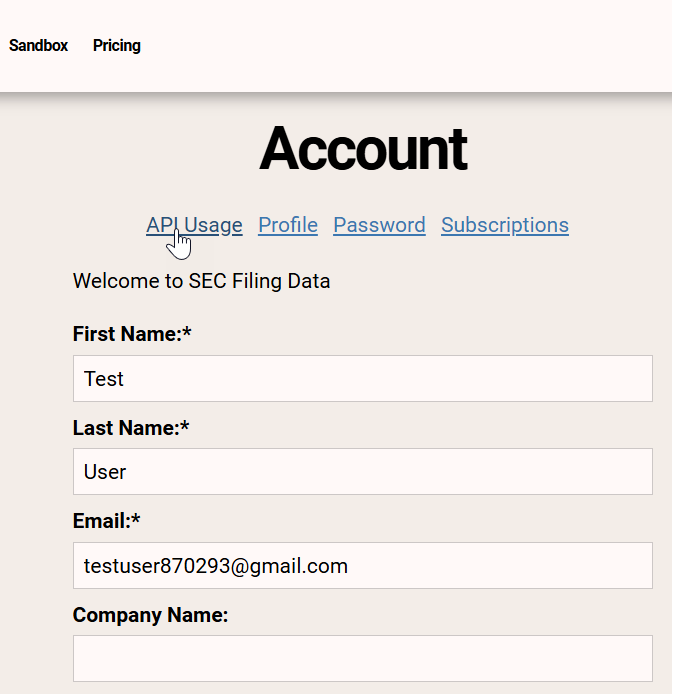
- Select API Usageunder Account

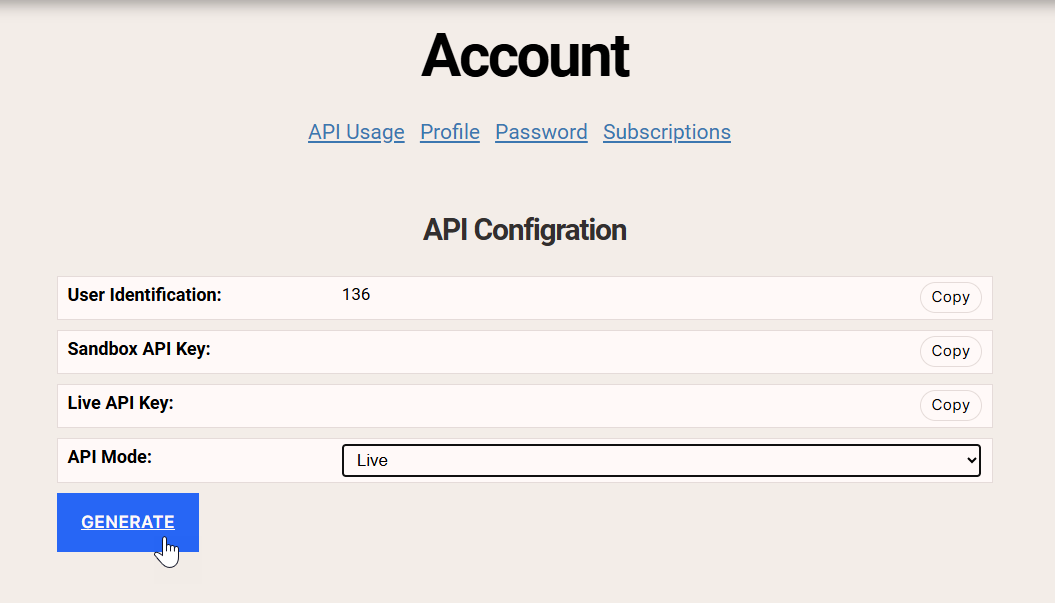
- Select Generate under API Configuration
Tip: If you get an authorization error while using the sandbox for the first time, try clearing your cookies.

- Go to the Sandbox to use your new API